Skip to content

Web platform

The workspace for the office.

Movea is software for moving companies, and the web platform is the office side of it. This is where you plan, price and invoice — from the enquiry on your website to the invoice being paid, in the browser, on the screen you already sit at.

See pricing
Calendar — today’s and this week’s jobs across crews and vans.

One move, all the way through one system.

The value isn’t a list of features. It’s that the enquiry, the job and the money are the same case all the way — from the customer filling in the form on your website to the review coming in. Here is every step.

01 · Enquiry

From your website to a job in the calendar

Put Movea’s quote form on your own website. Enquiries land in a shared inbox, sorted and ready to answer. When the customer says yes, the lead becomes a customer and a job with addresses, date and size already filled in.

  • The form in your own colours and font, in Danish, Swedish and English
  • Four short steps: what’s moving, addresses with floor and lift, date, and contact
  • Movea works out whether the customer came from search, social media, an ad or direct
  • Spam and duplicates are sorted out before anyone gets an email
  • A lead becomes customer and job in one click, and is marked won when the job is booked
02 · Quote

From enquiry to quote while the customer waits

The customer fills in the form on your website. One click turns the enquiry into a customer, a job and a quote already priced with your own rates. You adjust it and send it — and when the customer says yes, the move is booked.

  • Date, addresses, floor and lift come across from the form, so nothing is typed in twice
  • Driving, crew and stairs are priced with your own rates, and every line can be edited
  • The quote goes out in the customer’s own language, and the lead moves to Quoted
  • The customer says yes from a link, and the job is booked
03 · Overview

Find the job, create the next one, without hunting

Movea is built for the pace of the office. You search your way to jobs, customers and invoices, create the next thing right there, and see the day in front of you — the same flow whether you start from the overview, the calendar or a list.

  • Search across jobs, customers and invoices (⌘K)
  • Create a job, customer or invoice without leaving what you’re doing
  • An overview of the day, so you see what’s running and what’s missing
  • Filters and search on the lists, so you find the job straight away
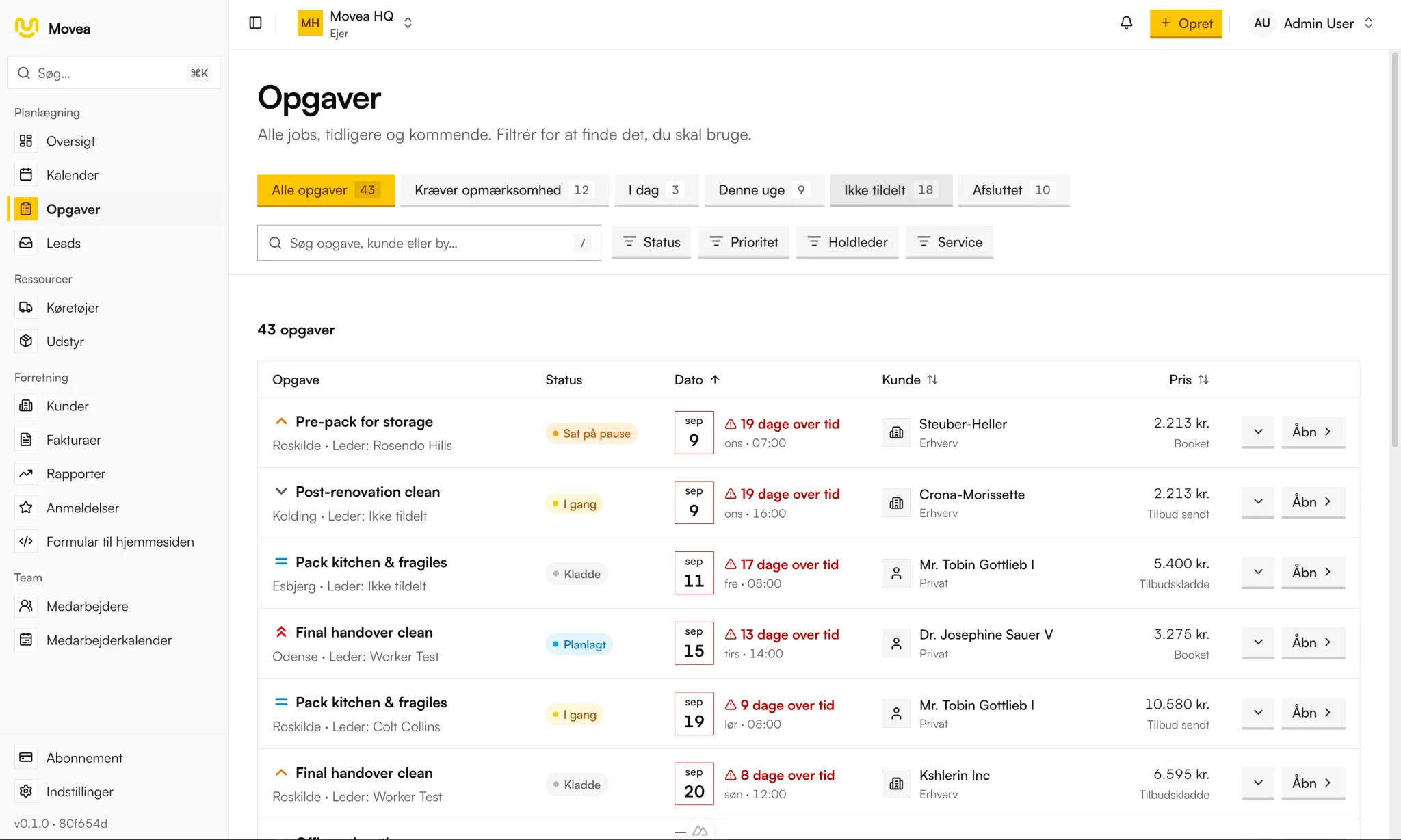
The job list in Movea with filters, search and status on every job
Jobs — search, filter and find the job without hunting.
04 · Finances

The money on the job — not in a separate spreadsheet

Quotes, invoices, status and margin live in the same system as the job. You can see where the money stands, and what a move actually returned, without pulling the numbers from somewhere else.

  • Quote and invoice are the same document from draft to paid
  • Status on every invoice, so you can see where the money stands
  • Profit and margin per job: revenue minus labour, fuel and overhead
  • Margins in total and split by service, not just per job
05 · The job

Everything about one move on one page

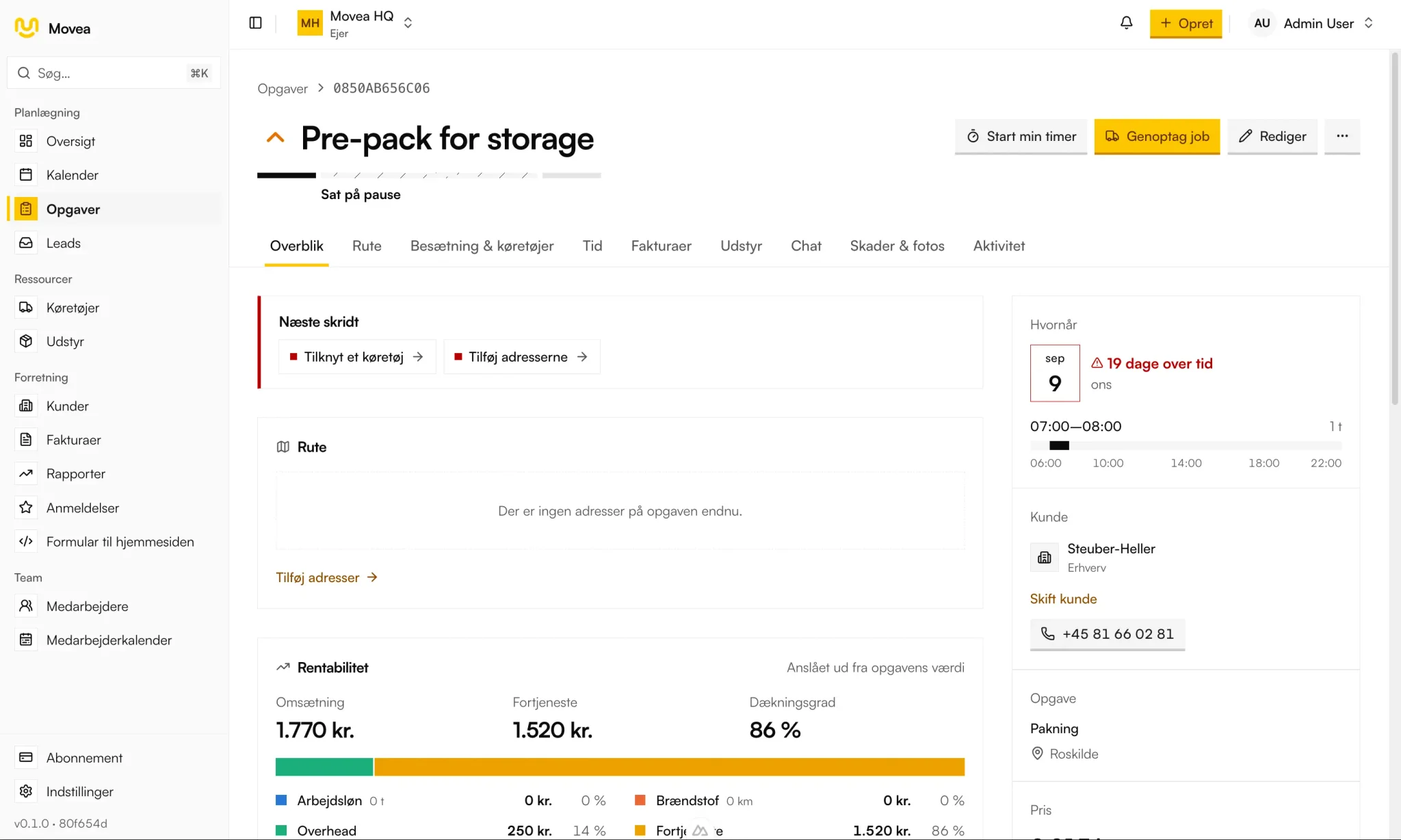
The job gathers customer, route, crew, vehicles, time, equipment, damage, messages and activity. Nobody has to ring around to find out what was agreed. It’s on the job.

  • Route with legs, distance and estimated driving time
  • Crew with lead, licence categories and phone numbers
  • Equipment is assigned to the job and signed back in afterwards
  • Activity log with who did what, and when
The job page in Movea with overview, details and profitability
The job — everything about one move on one page.
06 · Invoicing

Invoice before the vans are back

Tracked hours, distance driven and materials used are already on the job. The invoice is built from them, and afterwards you can see what the job actually returned.

  • Hours and mileage come from the job, not from memory
  • The invoice is built from the quote and what was actually driven
  • Booked into e-conomic and Dinero without typing the numbers in again
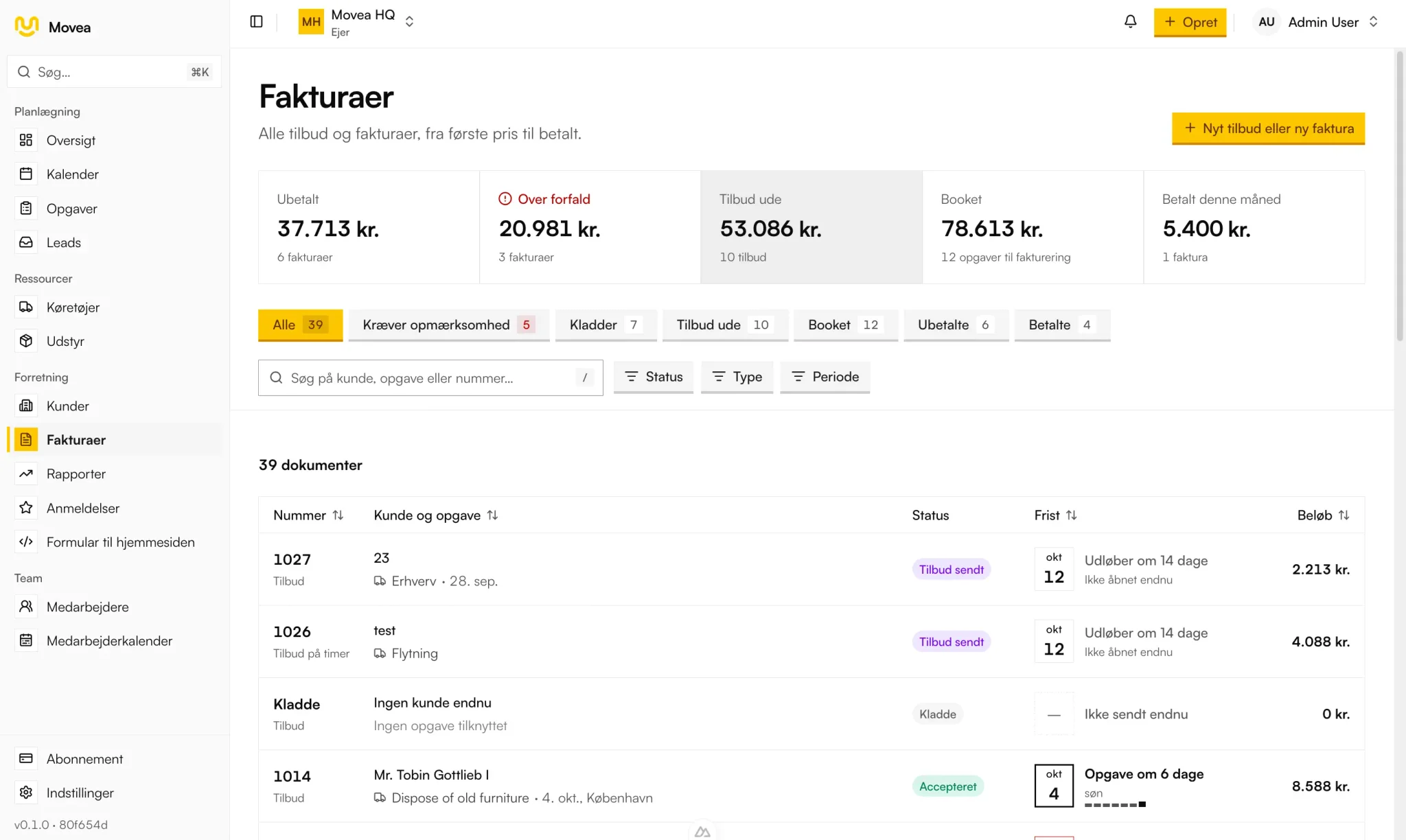
Invoice in Movea with lines, VAT, total and a send button
Invoice — built from the job’s own numbers, ready to send.
07 · Review

The customer gets asked. You see the answer.

Turn reviews on, and 48 hours after the move the customer gets an email with your logo: three questions with stars, what the crew did well, and room for a comment. The answers come together in one overview, so you see how it’s going and where to follow up.

  • Off until you turn it on, and can be turned off again at any time
  • Sent by itself 48 hours after the job is done, for jobs finished after you turned it on
  • Overall experience, the crew, and whether they’d recommend you
  • What customers praise the crew for, added up
  • Low scores are flagged, so you can call back
  • Only customers who have said yes to this kind of email are asked
Holiday and absence

The holiday is in the calendar before the crew is set.

Employees request holidays and call in sick from the app. The office approves in a shared team calendar, and whoever is away can’t be put on a crew on those days.

  • Holiday, sickness and other absence, full or half days
  • The office approves or declines requests, and the employee is notified
  • A holiday balance for every employee: earned, planned, taken and available
  • Jobs affected by the absence are shown with the request
  • The office is notified straight away when someone calls in sick

And the rest of the business in the same system.

Customers, people, vans and kit sit in the same place as the jobs. That’s why the numbers add up afterwards.

Customers

Everyone you’ve moved, with completed and upcoming jobs, and what they’ve spent with you.

Team and roles

The people in the workspace, what they have access to, and which licence categories they hold.

Vehicles

Vans, trucks and trailers, with inspections and servicing in the same calendar as the jobs.

Equipment

Tools, sack trucks and straps. Assigned to the job and signed back in, so the kit doesn’t disappear.

Margins

Profit and margin on completed jobs, in total and split by service.

Settings

Rates and cost rates, integrations, and login with two-factor.

Everything the moving software also does.

The chain above is the backbone. Here is the rest, grouped by where in the day it gets used. Everything on the list is built and included in the per-user price.

Calendar and scheduling

Day, week, several weeks and month
Jobs sit at their real times, even when a move runs past midnight. The week number is in the address, so a week can be shared as a link.
Inspections and servicing in the calendar
The vans’ inspection and service dates sit next to the jobs, so a van doesn’t get booked on the day it’s due at the garage.
Suggested crew and van
The system knows who and what is free in the job’s time slot, and suggests crew and vehicle.
No double booking
A crew member or a van can’t be on two jobs that overlap. The system rejects it, it doesn’t just warn about it on screen.

Route planning and driving

Real kilometres and driving time
Pick-up, stops and delivery with road distance and driving time, not as the crow flies. Price and margin are worked out on the kilometres that actually have to be driven.
Access conditions at every stop
Lift, stairs, long carry and parking are on the stop, so the crew knows before they pull up at the door.
Optimise the stops in one click
Movea puts the stops in the order that gives the least empty running, and shows how many kilometres the new order saves.

Crew and time

Crew with a crew lead
Several crew members per job and one lead. If a crew member is missing a phone number, it’s flagged before you need it.
SMS to the whole crew
One click. Every message keeps a record of exactly who received it and whether it got through, even after the crew has been changed.
Time tracking
Start and stop a clock on the job, or enter the time afterwards. Hours per person and in total on the job.
Holiday and absence
Holidays, sick days and half days in a shared team calendar. Approved absence blocks the employee from new jobs, and crew suggestions skip whoever is away.
Five roles
Owner, administrator, finance, lead and crew member. A crew member sees their own day and week, not the company’s finances.
Licence categories
The categories are on the crew member, so the right driver ends up in the right van.

Damage and documentation

Damage on the job
Severity, note and as many photos as it takes, straight from the phone. The photos are compressed automatically.
Activity log
Every creation, edit and deletion is on the job with name and time. The same goes for customers and vehicles.

Fleet and inspections

Vehicle register
Vans, trucks and trailers with capacity, licence category, registration number and status.
Number plate lookup
Enter a Danish number plate, and Movea fetches make, model and inspection dates from the Danish motor register.
Inspection overview
Colour codes show which vans are due for inspection soon, and a warning at the top catches the ones that are overdue.
Servicing and blocking
Book a service, take the van out of operation in the meantime, and put it back in operation with the next service planned. A blocked van can’t be put on new jobs, and upcoming jobs it is already on get flagged.
Damage to the van
Anyone on the crew can report damage with type, description and photo. Owner and administrator are told straight away.

Finances

Quote and invoice in one
The draft is the quote. Create it from the job in one click, with lines filled in from your rates and the route, and follow it from sent to accepted to paid. Invoice numbers are assigned automatically.
No finished job without an invoice
If you close a job without an invoice, Movea asks whether to create it now. Only finance users are asked, not the crew.
Profit per job
Revenue minus real cost: tracked hours, kilometres driven and overhead, with margin as a percentage.
Margin overview
Revenue, cost, profit and margin for any period you choose, split by service.
Your own rates
Rates for labour, fuel and overhead are the basis for every margin figure. You set them yourselves.
Several currencies
DKK, SEK, NOK and EUR, with reverse charge where it applies. Every job remembers the currency it was priced in.
Accounts
Invoices sync to e-conomic and Dinero.

Customers

Customer archive
Everyone you’ve moved, with value, job history and contact details, and filters that find them again.
The customer page
Total revenue, pipeline, recent jobs, internal notes and activity.
Recognising returning customers
A customer who comes back is matched on their contact details, without those details sitting readable in the database.

Leads and reviews

Quote form for your website
You set the colours, font, questions and texts yourself, with a preview on desktop and phone. It goes on your website with a small snippet of code.
Lead inbox
New, contacted, quoted, won or lost, with notes and a fixed reason when a lead is lost. Enquiries by phone are added by hand.
Where customers come from
Channel, campaign and page for every lead, and in the report how fast you answered and how many became jobs.
Blocking
Block an email, a phone number or a whole domain. The blocked sender gets the same answer as everyone else, but nothing is stored.
Review overview
Score over time, the three questions, what the crew is praised for, and how many answer. Averages per crew member only show from three reviews.

Automatic messages

Inspections and servicing
Owner and administrator get an email and SMS 45, 30, 14, 7 and 3 days before, gathered in one message per company.
Tomorrow
The evening before, every crew member gets their jobs, times and stops for the next day.
Reviews
48 hours after the move, the customer gets an email asking for a review. Only customers who have said yes to that kind of email. Off until you turn it on.
SMS with a safety net
Duplicates are filtered out, and there is a cap on the number of messages per recipient and per company. Every SMS on a job is in the job’s log, including the ones that failed.

Security and data

Separated data
Each company’s data is logically separated from the others’. Every query is automatically scoped to your company on the server, and without a valid company nothing is returned.
Encryption
Sensitive personal data is encrypted in the database and hidden in the system’s responses, and the system is built not to write it to log files.
Access is checked on the server
Every action is authorised against the user’s role before it is carried out.
Two-factor login
Every user can switch on two-factor for their login.

See it running on your own jobs.

20 minutes online, where we set up your rates, crews and vans and run a real move through the system. No lock-in, no installation.

Mobile app